Connect ClickFunnels 2.0 & set up funnel tracking
FunnelTrack captures form submissions, orders, subscriptions, appointments, course enrollments, and pipeline events from ClickFunnels 2.0 server-side via webhooks — then stitches each one back to the visitor's ad session through the FunnelTrack pixel. Every conversion you fire to Meta, Google, TikTok, and the rest carries the original click ID, identity data, and session context.
- •A ClickFunnels 2.0 workspace + admin access
- •The FunnelTrack pixel deployed on every page of your site — plus any third-party landing pages or funnels that feed into your ClickFunnels 2.0 funnels
- •At least one connected destination (Meta CAPI, Google Ads, GA4, etc.)
- •About 10 minutes for the initial setup, then ~30 seconds per funnel to drop the pixel into Head Code
Setup
Connect ClickFunnels via OAuth, drop the FunnelTrack pixel into each funnel, then enable the events you want to track.
Connect ClickFunnels via OAuth
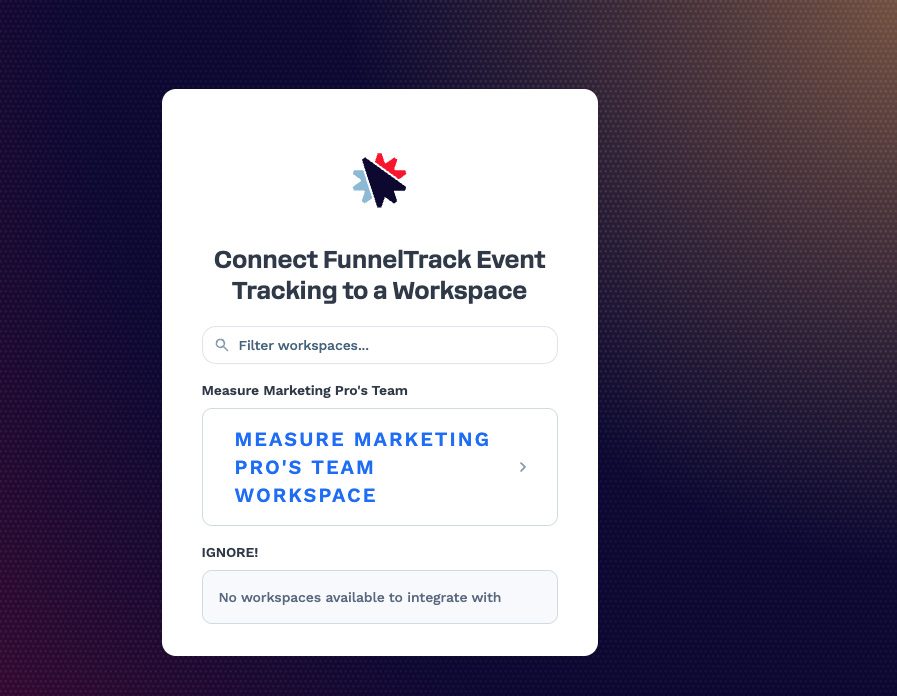
In FunnelTrack, open Integrations → Sources → ClickFunnels and click Connect. You'll be redirected to ClickFunnels to authorize FunnelTrack, then prompted to pick the workspace you want to track. After approval, ClickFunnels redirects you back to FunnelTrack with the integration connected.
Deploy the FunnelTrack pixel on each funnel
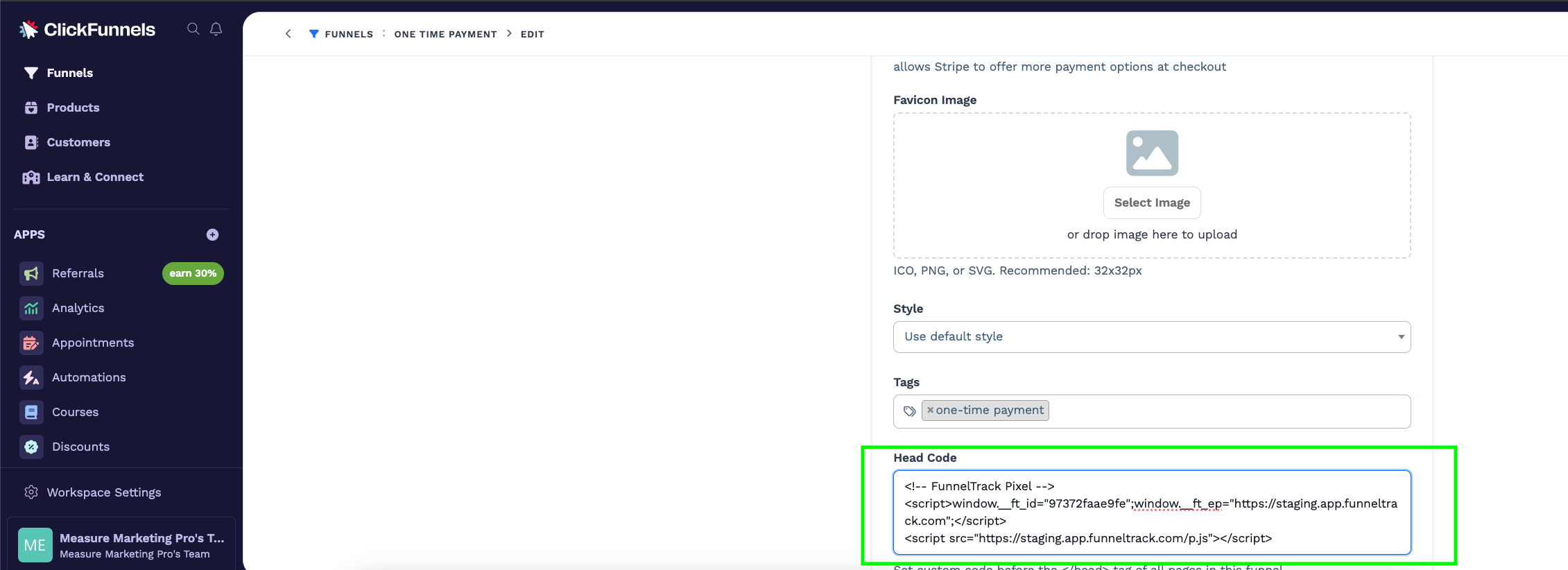
The FunnelTrack pixel needs to be on every page of every funnel you want to track. In ClickFunnels, pixels are configured per-funnelvia Head Code — so you'll repeat this once for each funnel.
Open the funnel and go to Funnels → Edit Funnel → Head Code. Paste your FunnelTrack pixel snippet into the Head Code box and save.
Enable the events you want to track
Open a connected destination's routing page — e.g. ClickFunnels → Meta Conversions API. You'll see one template card per ClickFunnels event type, grouped by category (Tracking, Lead Generation, Purchases, Subscriptions, Pipeline, Courses). Toggle on the events you want to fire, pick a destination event for each (Meta's Lead / Purchase, a Google Ads conversion action, etc.), and save.
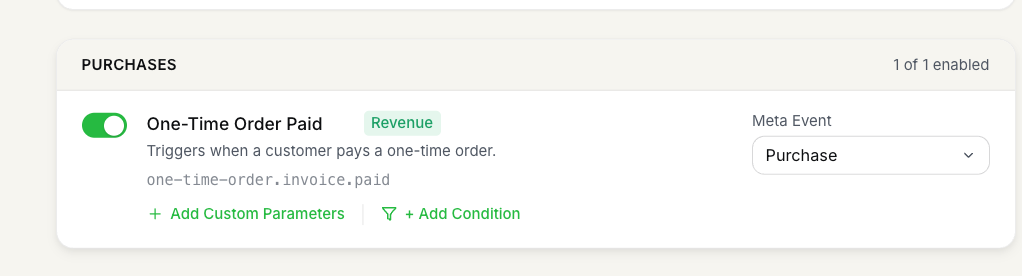
The full list of supported ClickFunnels 2.0 events:
| Source event | Trigger key / when it fires |
|---|---|
| Page View | __pageview__ — fires on every page load tracked by the FunnelTrack pixel. |
| Contact Created | contact.created — a new contact lands in your CF2 workspace. |
| Form Submission | form_submission.created — a CF2 form is submitted in any funnel. |
| One-Time Order Paid | one-time-order.invoice.paid — a customer pays a one-time order. Revenue available. |
| Subscription First Payment | subscription.first_payment_received — the first payment on a new subscription is collected. Revenue available. |
| Subscription Invoice Paid | subscription.invoice.paid — any subsequent recurring invoice on a subscription is paid. Revenue available. |
| Appointment Scheduled | appointments/scheduled_event.created — a contact books an appointment through CF2 Appointments. |
| Opportunity Created | sales/opportunity.created — a new opportunity is created in the CRM pipeline. Revenue available. |
| Opportunity Moved Stage | sales/opportunity.moved_stage — an opportunity advances to a new pipeline stage. |
| Contact Course Enrollment | courses/enrollment.created — a contact enrolls in a course. |
| Contact Completed Course | courses/enrollment.course_completed — a contact finishes a course. |
(Optional) Map event parameters
Click + Add Custom Parameters on a card to send extra fields to the destination. Parameters can be static (you type the value) or dynamic (pulled from the CF2 webhook payload using the Field picker).
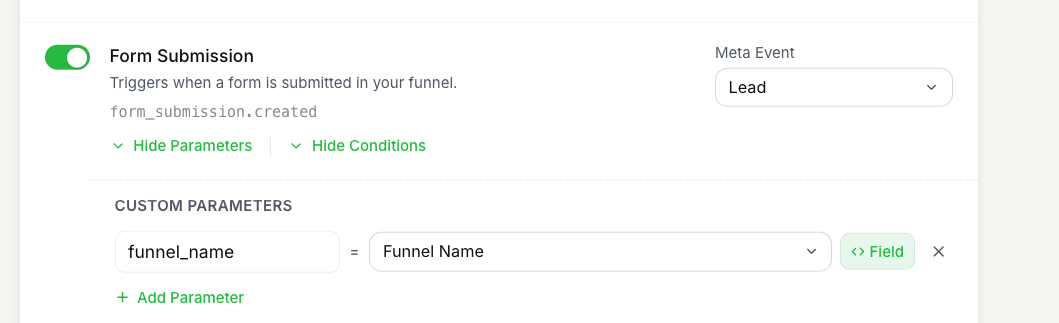
Read more about using event parameters in FunnelTrack. The CF2 payload fields available as dynamic values vary by event; the most useful per-event-type fields are:
| Event type | Available payload fields |
|---|---|
| Form Submission | Funnel Name, Funnel Step, Page Path, Page Name, Page Title, Page Type |
| Appointment Scheduled | Funnel Name, Funnel Step, Page Path, Page Name, Page Title, Event Type ID |
| One-Time Order Paid | Funnel Name, Page Name, Product Name, Order Number, Order Type, Billing Status, Order Total, Origination Channel, Payment Processor |
| Subscription First Payment | Funnel Name, Page Name, Product Name, Order Number, Billing Status, Amount, Origination Channel, Payment Processor |
| Subscription Invoice Paid | Product Name, Billing Status, Amount, Payment Processor |
| Opportunity Created / Moved Stage | Pipeline Name, Stage Name, Opportunity Name, Status, Value |
| Course Enrollment / Completed | Course Name, Course ID, Origination Source |
| Contact Created | Funnel Name, Page Name |
(Optional) Set firing conditions
Click + Add Condition on a card to gate the dispatch behind one or more rules on the CF2 payload — useful when you want one event to fire as a different destination event based on funnel / product / pipeline context.
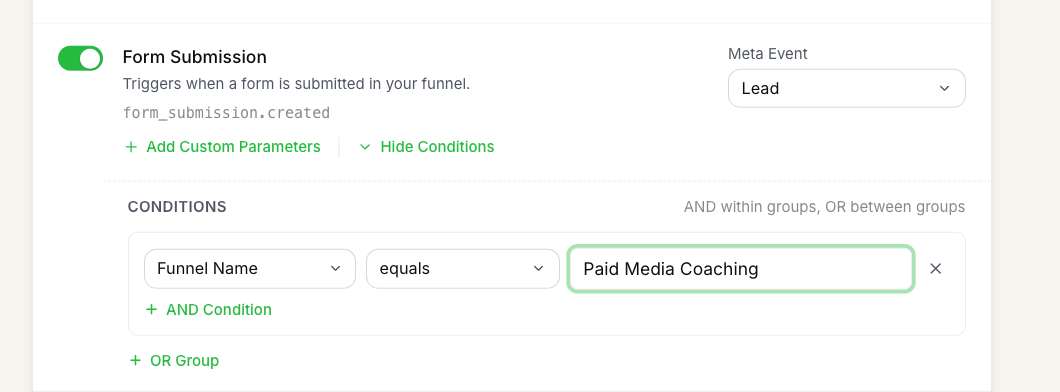
A few patterns customers run a lot:
- •Funnel-scoped lead events — a single
form_submission.createdcard that only fires for one funnel (Funnel Name equals "Paid Media Coaching"). Build one per lead-gen funnel so each gets its own Meta / Google conversion attribution. - •Pipeline-stage milestones — fire a Meta custom event when an opportunity advances to a specific high-intent stage (
sales/opportunity.moved_stagewithStage Name equals "Demo Scheduled"). - •High-value purchase split — split
one-time-order.invoice.paidinto two cards, one withOrder Total > 500firing a customHighValuePurchaseevent, the other firing a standardPurchase.
Read more about using conditions in FunnelTrack.
Test & deploy
Submit a real test on the funnel — fill in a form, complete a test purchase, book a test appointment, etc. Within a few seconds you should see an inbound row in the usage log labeled with the ClickFunnels event name (e.g. Form Submission, One-Time Order Paid), followed by one outbound row per connected destination — each delivered to the destination event you configured.

Notes & best practices
A few things worth knowing before you scale this across every funnel and destination.
- •Pixel install is per-funnel in CF2. ClickFunnels 2.0 doesn't expose a workspace-wide head code, so you'll add the FunnelTrack pixel into each funnel's Edit Funnel → Head Code individually. New funnels need the pixel added at launch — make it part of your funnel template if possible.
- •One OAuth connection, every event type.The ClickFunnels OAuth grant covers form submissions, orders, subscriptions, appointments, courses, and pipeline events — so you don't need to revisit the connection when adding new event types later. Just toggle the template card on a destination's routing page.
- •Funnel-scoped events keep reporting clean. By default the template cards fire on every funnel — including internal ones (employee onboarding, internal checkouts). Use a
Funnel Namecondition on lead-gen / purchase cards to keep internal events out of your paid-ad reporting. - •Disconnect cleans up after itself. When you disconnect ClickFunnels from FunnelTrack, we also delete the webhook endpoint we registered in your CF2 workspace — no orphaned endpoints left behind.
FAQs
sales/opportunity.moved_stageships without revenue in the CF2 payload. FunnelTrack enriches the revenue at dispatch time from the opportunity's value field — make sure the opportunity in CF2 has a value set, otherwise the dispatched event carries no revenue.Ready to set it up?
Jump straight into your FunnelTrack workspace and connect ClickFunnels.
Configure your ClickFunnels integration →Need a hand?
If anything in this guide didn't match what you're seeing in ClickFunnels or FunnelTrack, open a support ticket in your dashboard and we'll get you sorted.