
Connect Unbounce & set up form-submission tracking
Unbounce form submissions hit FunnelTrack via webhooks. FunnelTrack matches each submission to the visitor's pre-submission ad session using the FunnelTrack pixel plus IP + user-agent fingerprinting, then routes the conversion to Meta, Google Ads, GA4, TikTok, and any other connected destination — each with a deduplication-grade event ID so your platform-side reporting stays clean.
- •An Unbounce Build plan or higher. Unbounce gates both Script Manager (needed to deploy the FunnelTrack pixel) andwebhooks (needed to send form submissions to FunnelTrack) behind the Build tier. Starter / Launch plans can't use either.
- •Admin access to your Unbounce account
- •The FunnelTrack pixel deployed on every Unbounce page
- •At least one connected destination (Meta CAPI, Google Ads, etc.)
- •About 10 minutes per page with a form
Setup
Deploy the pixel, wire each page's webhook to FunnelTrack, then configure events per destination.
Add the FunnelTrack pixel via Script Manager
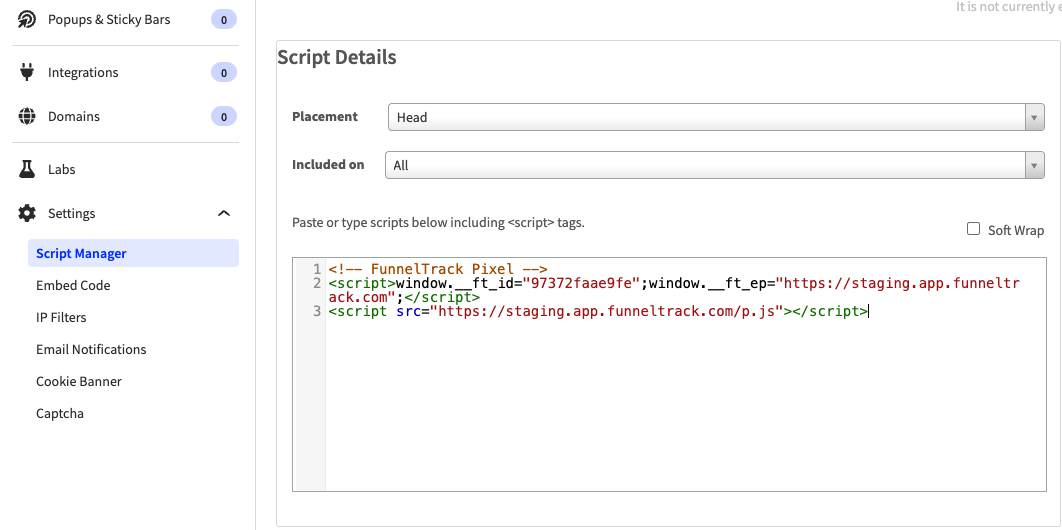
In Unbounce, open Script Manager and add your FunnelTrack pixel snippet. Use these settings:
- •Placement —
Head - •Included on —
Allpages
Open the page where your form lives
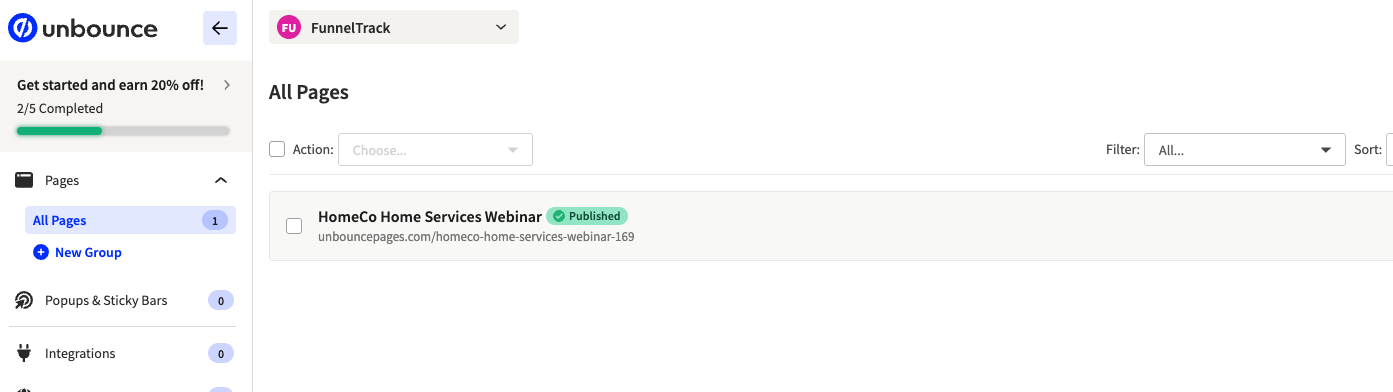
Webhook setup in Unbounce is per-page. From the Unbounce pages list, open the landing page that contains the form you want to track. You'll repeat this step for every page with a form.
Add the FunnelTrack webhook URL
On the page's overview, open the Webhooks tab and paste the FunnelTrack webhook URL from Integrations → Sources → Unbounce. Set the request format to JSON.
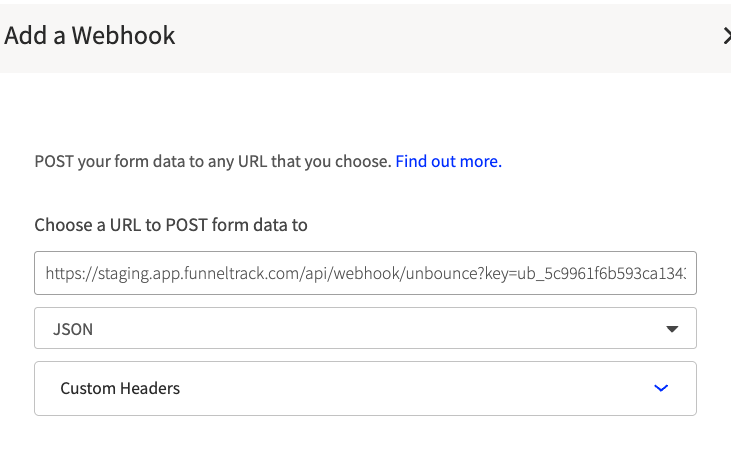
The URL follows this format:
https://app.funneltrack.com/api/webhook/unbounce/{workspace_id}Standard form data mapping — do not edit
Unbounce ships two sets of fields in the webhook payload by default: Page Data (auto-populated by Unbounce) and Form Data (the fields your visitor filled out). FunnelTrack reads both by their default names, so the mapping section on the Unbounce side should be left as-is.
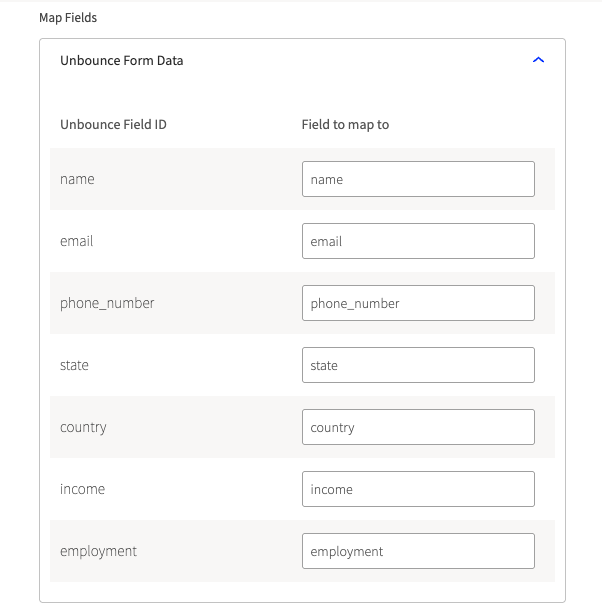
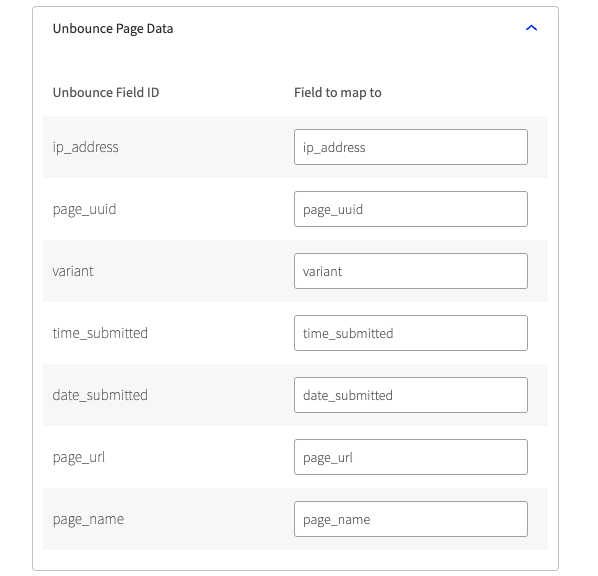
- •
email— primary email captured by the form - •
ip_address— visitor IP - •
page_uuid— Unbounce page UUID (form discriminator) - •
variant— A/B variant (a,b, etc.) - •
time_submitted— UTC time - •
date_submitted—YYYY-MM-DD - •
page_url— page URL - •
page_name— page name
| Field on your form | FT canonical | Auto-detected Unbounce field ID(s) |
|---|---|---|
| First Name | first_name | first_name |
| Last Name | last_name | last_name |
| Full Name | first_name + last_name | name (FT splits on first space) |
email | ||
| Phone | phone | phone or telephone |
| Country | country | country |
| Region/State/Province | region | state, province, or stateprovince |
| City | city | city |
| Zip / Postal Code | zip_code | zip, zip_code, postal_code, or postcode |
If you've already shipped forms with custom field IDs (like contact_email or mobile_number), don't panic — FunnelTrack's value-pattern detection still catches email-shaped and phone-shaped values regardless of the field name. For anything else, use the User Data section on the FT event to manually map.
(Optional) Add a custom form_id field — Pro Tip
By default Unbounce ships page_uuid as the form identifier, which is functional but not human-readable. Adding a hidden custom field on the Unbounce form called form_id with a friendly value (e.g. webinar_lead or contact_us) lets you reference that name as a custom event parameter or filter condition inside FunnelTrack.
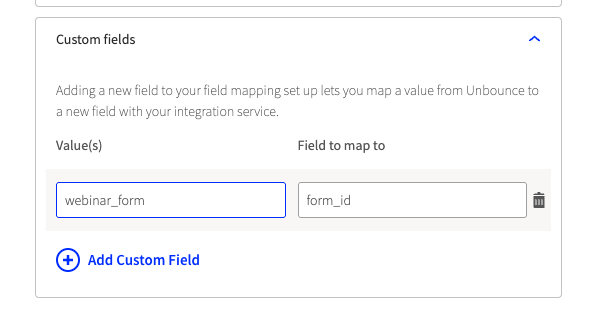
form_id gives you one consistent identifier to filter and route on — instead of juggling a list of page_uuids.Add a form-submission event in a connected destination
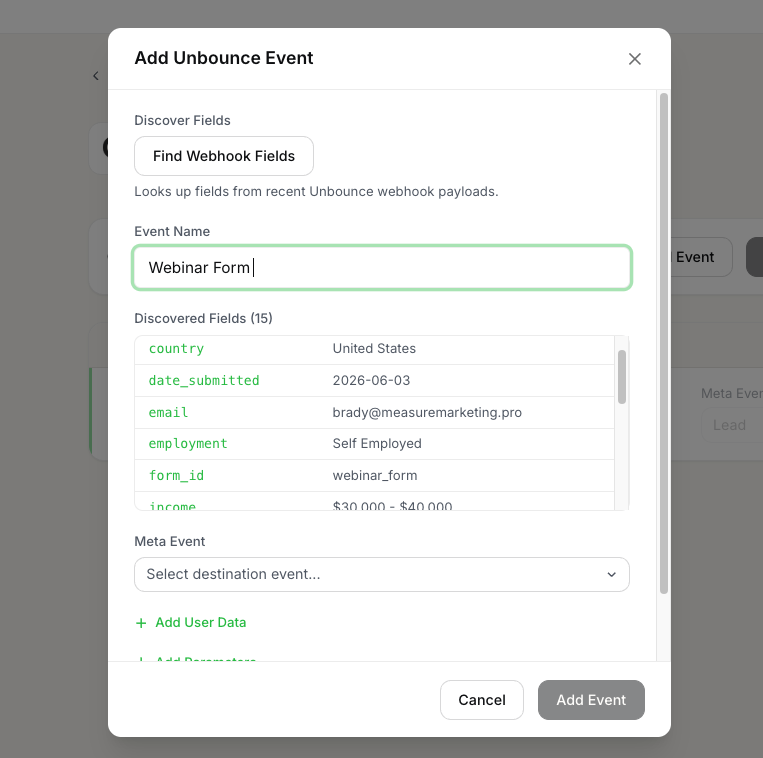
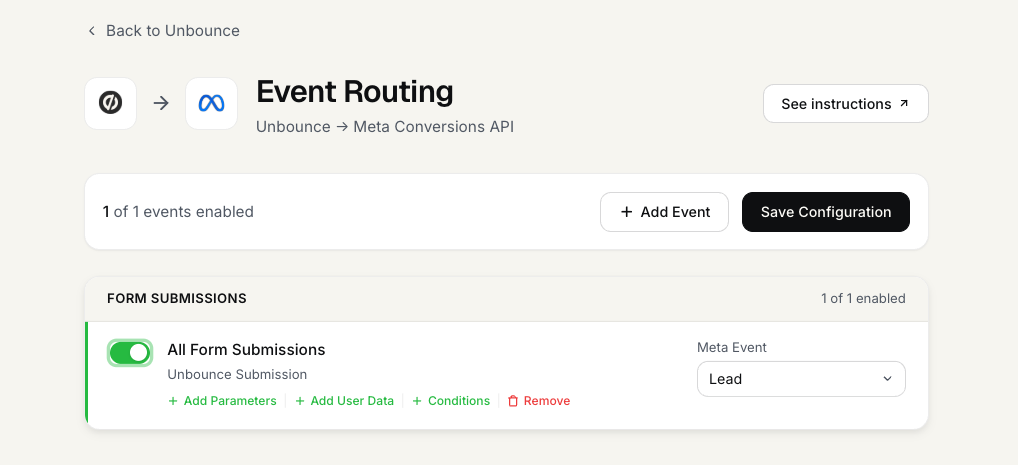
In FunnelTrack, open a connected destination's routing page (e.g. Unbounce → Meta Conversions API). Either use the All Form Submissions template for broad coverage, or add a per-form custom event. Then:
- •Submit a test form so FT has a payload to discover
- •Click Add Event
- •Click Find Last Submission to pull the discovered field schema
- •Assign an event name (this is what shows in the integration's event summary and on the outbound dispatch)
(Optional) Map Event Parameters + User Data Parameters
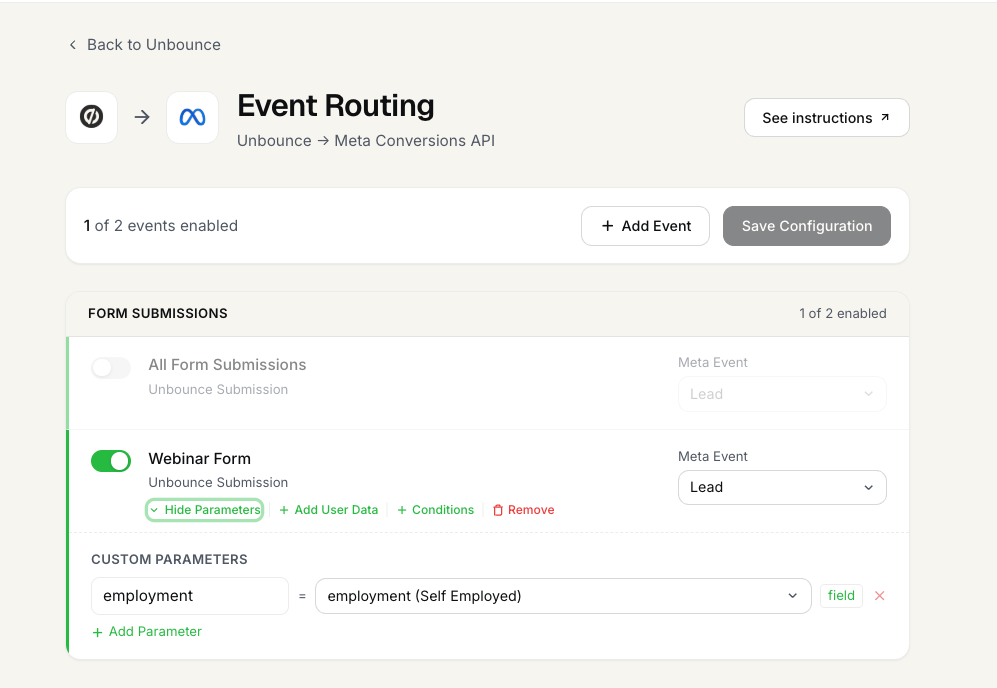
Two kinds of parameters can be mapped on the event:
- •Event Parameters — static values you type in (e.g.
currency: USD) or dynamic values mapped from form fields (e.g.valuefrom a budget field). These ship to the destination as standard or custom event parameters. - •User Data Parameters — FunnelTrack auto-captures email, phone, name, address, etc. from the standard fields. If your form collects identifiable info for multiple people (e.g. a referral form with both referrer and referee emails), use this section to manually map which field is the primary contact. Otherwise FT picks the first found contact value automatically.
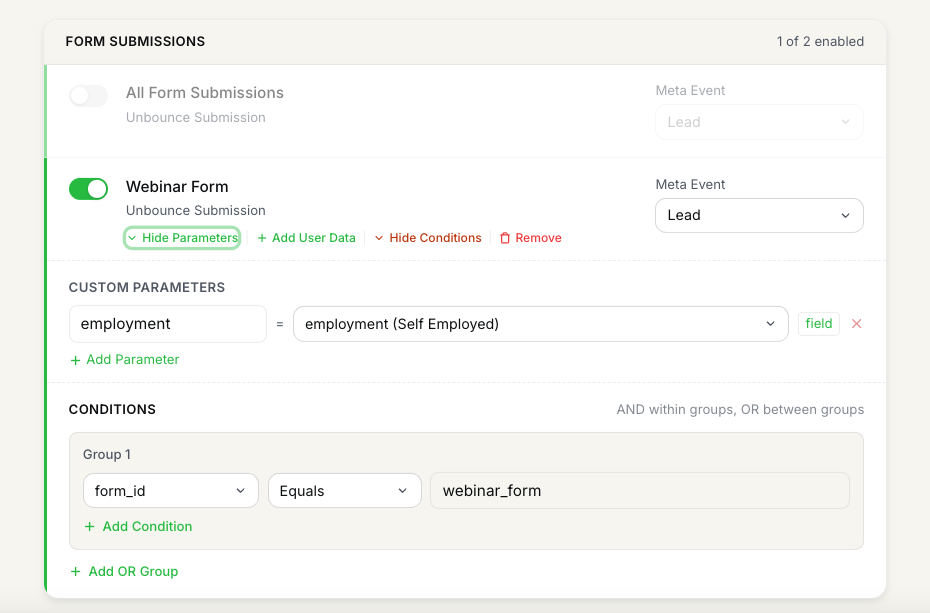
(Optional) Set Event Conditions
Use the Conditions section to fire the event only when the submission matches certain criteria. A common Unbounce pattern is gating on variant to split A/B-test conversions into separate reporting events — e.g. only fire the event when variant equals a.
Test & deploy
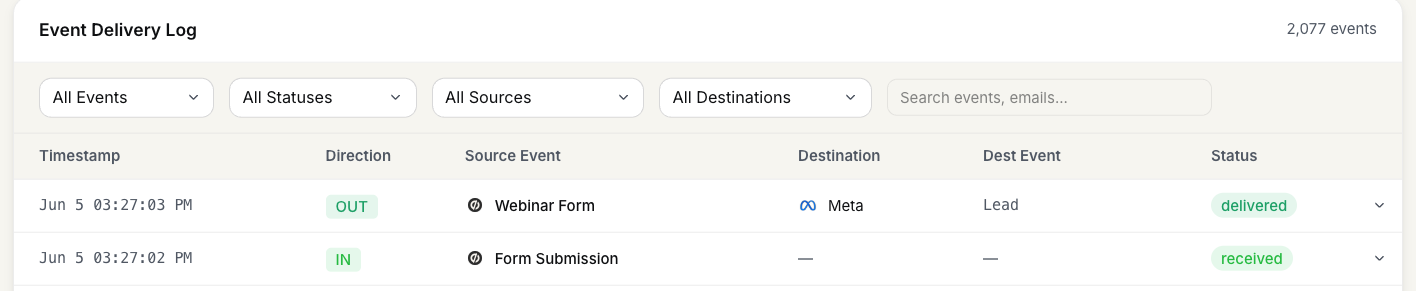
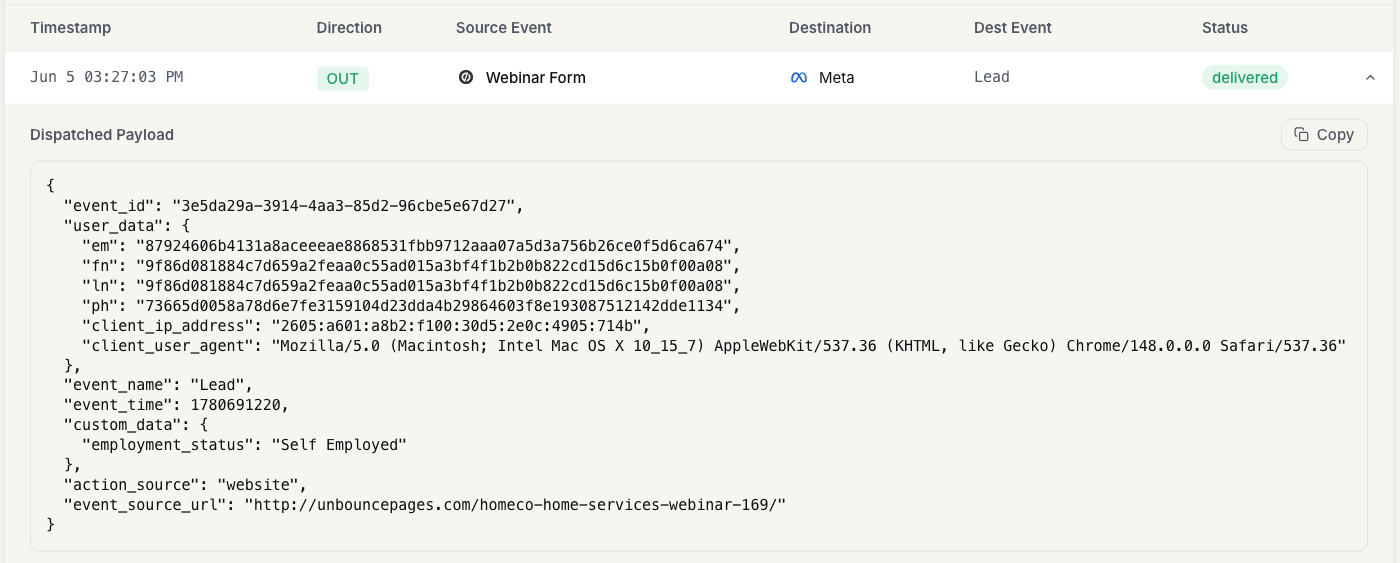
Save the event card. Submit a final test entry on the form — the saved card on the routing page summarizes the event as configured, the inbound usage log row reads Form Submission, and the outbound log row reads the destination event name you assigned.
Notes & best practices
A few things worth knowing before you scale this across every Unbounce page.
- •Unbounce webhook setup is per-page.If you have a form on 5 landing pages, configure 5 webhooks. Same FunnelTrack URL, just paste it into each page's Webhooks tab.
- •The FT pixel must be deployed via Script Manager. Set Placement to
Headand Included on toAll. Without the pixel, FT still receives the webhook but can't stitch it to the visitor's pre-submission browsing — match quality drops materially. - •
page_uuidis the discriminator FT uses to identify forms. Unbounce doesn't have form-level IDs like Gravity Forms or Jotform — every form is "the form on this page." Add a customform_idhidden field if you want human-readable identification. - •A/B variants on the same page share a
page_uuidbut differ onvariant. Use Conditions (variant equals a) to route variants to different conversion events. - •One webhook URL, every page.Your workspace has a single FunnelTrack webhook URL — paste the same URL into every Unbounce page's Webhooks tab. FT routes based on
page_uuid(and optionalform_id) inside the payload.
Events we support
What Unbounce can send to FunnelTrack out of the box.
Unbounce ships one event type through its webhooks: a form submission. FunnelTrack receives the full payload and discovers every field on the form, so you can map any of them to event parameters or user data on the destination side.
There's no fixed event catalog here — each page's submission is the event, and page_uuid (plus an optional custom form_id) is the discriminator FunnelTrack uses to route it to the right destination config.
Common tracking examples
A few patterns most FunnelTrack accounts end up running.
- •Lead-gen page → Meta Lead. A single form with standard
email+phonemapping fires MetaLeadserver-side. This is the highest-volume use case and recovers the conversions Meta's client-side pixel was losing. - •Multi-page webinar funnel → GA4
generate_lead+ Google Ads conversion. Same webhook, two destinations, separate event cards each with the page'spage_uuidbaked into the trigger. - •A/B test routing → split variants to different reporting events. Use the Conditions section to filter on
variantso variant A and variant B fire distinct conversion events for clean comparison reporting.
FAQs
email, ip_address, page_uuid, variant, and the rest by their exact default names. Renaming them in the Unbounce webhook mapping breaks auto-detection and forces you to manually re-map everything inside FunnelTrack.page_uuid— Unbounce's per-page identifier. For human readability or cross-page form identity (e.g. the same lead form embedded on five pages), add a custom form_id hidden field per Step 5 and filter or route on it instead.Ready to set it up?
Jump straight into your FunnelTrack workspace and start wiring up your first Unbounce page.
Configure your Unbounce integration →Need a hand?
If anything in this guide didn't match what you're seeing in Unbounce or FunnelTrack, open a support ticket in your dashboard and we'll get you sorted.