
Capture ft_sid & ft_uid in Stripe metadata
Stripe webhooks reach FunnelTrack's server with no browser context, so they carry no cookies. To attribute a payment to the ad session that produced it, you attach the visitor's FunnelTrack IDs to the Stripe object when you create it. This guide shows how to read those IDs in the browser, pass them to your server, and pin them onto a Checkout Session, Payment Intent, or Payment Link.
This is the deep-dive companion to the Stripe setup guide. If you just need the high-level steps, start there.
The two identifiers
What ft_sid and ft_uid are, and where they come from.
The FunnelTrack pixel creates two first-party identifiers when a visitor lands on your site and stores them in cookies:
- •
ft_sid— the session id. Tied to a single visit and to the click IDs, UTMs, and referrer captured on it. Read it withwindow.ft.getSessionId(). - •
ft_uid— the visitor id. Durable across visits, so it still resolves when the buyer clicked the ad on one visit and paid on another. Read it withwindow.ft.getUserId().
Pin both. ft_sid is the most precise match; ft_uid is the fallback that spans sessions.
1. Read the IDs in the browser
Wait for the pixel to be ready, then read both IDs off window.ft.
The pixel loads asynchronously, so window.ft may not exist the instant your script runs. Wait for it before reading. This helper resolves once ft_sid is available (or after a short timeout), and returns whatever it has:
// Resolves with { ft_sid, ft_uid }. Never rejects — checkout should
// proceed even if the pixel is slow or blocked.
function getFtIds(timeoutMs = 4000) {
  return new Promise((resolve) => {
    const start = Date.now();
    (function poll() {
      const ft = window.ft;
      const sid = ft && typeof ft.getSessionId === "function" ? ft.getSessionId() : null;
      const uid = ft && typeof ft.getUserId === "function" ? ft.getUserId() : null;
      if (sid || Date.now() - start > timeoutMs) {
        resolve({ ft_sid: sid || null, ft_uid: uid || null });
        return;
      }
      setTimeout(poll, 100);
    })();
  });
}getFtIds resolves with null values after the timeout. Send whatever you have and let checkout proceed. FunnelTrack falls back to a hashed email / phone match when the IDs are absent, so a missing pixel degrades gracefully rather than breaking the sale.2. Pass the IDs to your server
The Checkout Session is created server-side, so the IDs have to make the trip.
Read the IDs in the browser and include them in the request that creates the Checkout Session:
// Browser — when the visitor clicks "Buy" / "Subscribe"
const { ft_sid, ft_uid } = await getFtIds();

const res = await fetch("/create-checkout-session", {
  method: "POST",
  headers: { "Content-Type": "application/json" },
  body: JSON.stringify({ ft_sid, ft_uid, priceId: "price_123" }),
});
const { url } = await res.json();
window.location.href = url; // Stripe-hosted redirect3. Attach the IDs to the Stripe object
Pin ft_sid and ft_uid onto metadata (and subscription_data.metadata for subscriptions).
Checkout Session (hosted or embedded)
Set metadata at the session level. For subscriptions, also set subscription_data.metadata so the IDs propagate to customer.subscription.created and every future invoice.payment_succeeded. The same code works for both ui_mode: "hosted" and ui_mode: "embedded".
// Server — Node
const session = await stripe.checkout.sessions.create({
  mode: "subscription",     // or "payment"
  ui_mode: "hosted",        // or "embedded"
  line_items: [{ price: priceId, quantity: 1 }],
  metadata: {
    ft_sid: ftSid || "",
    ft_uid: ftUid || "",
  },
  subscription_data: {
    metadata: { ft_sid: ftSid || "", ft_uid: ftUid || "" },
  },
  success_url: "https://yoursite.com/success",
});Payment Intent (custom Payment Element flow)
If you charge with the Payment Element and a Payment Intent instead of Checkout, set metadata on the Payment Intent:
const intent = await stripe.paymentIntents.create({
  amount: 4999,
  currency: "usd",
  metadata: { ft_sid: ftSid || "", ft_uid: ftUid || "" },
});Payment Link (no backend)
A no-code Payment Link can't take metadata, but it accepts client_reference_id. Append it to the link URL, built from ft_sid. FunnelTrack reads client_reference_id as a hard-stitch source.
const { ft_sid } = await getFtIds();
const url = "https://buy.stripe.com/xxxx" +
  (ft_sid ? "?client_reference_id=" + encodeURIComponent(ft_sid) : "");
window.location.href = url;ft_sid (the precise session). If you need the durable ft_uid fallback too, use a Checkout Session with metadata instead of a Payment Link.Where FunnelTrack looks for the IDs
The resolution order on every Stripe webhook.
For each event, FunnelTrack looks for ft_sid in these locations, in order, and uses the first it finds:
- •
object.metadata.ft_sid - •
object.parent.subscription_details.metadata.ft_sid(invoice events on newer API versions) - •
object.subscription_details.metadata.ft_sid - •
object.client_reference_id(Checkout Sessions and Payment Links)
If no session id resolves, FunnelTrack tries ft_uid from the same metadata locations, then falls back to a hashed email / phone match. Setting subscription_data.metadatais what keeps renewals attributed, because renewal invoices inherit the subscription's metadata, not the original session's.
ft_sid and ft_uidare UUID-shaped strings (letters, digits, hyphens). Pass them through unchanged. FunnelTrack validates the shape on receipt and ignores anything that doesn't look like an ID, so a stray or empty value can't break the stitch.Verify
Confirm the IDs arrived on the webhook.
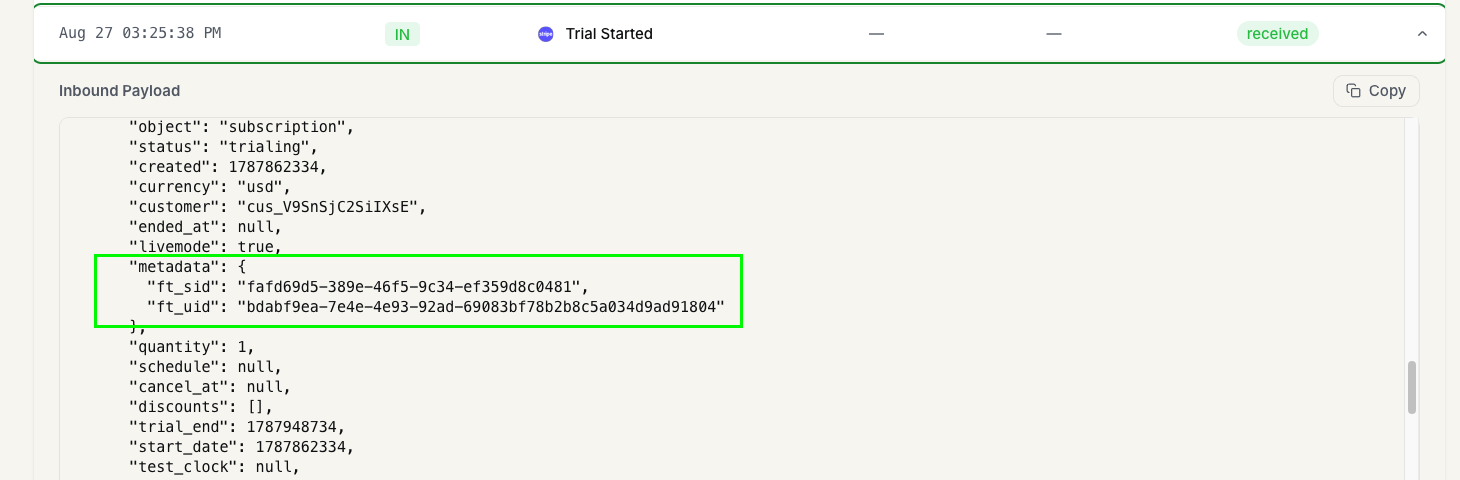
Run a checkout, then open the Event Delivery Log in FunnelTrack, expand an inbound Stripe event, and check the payload. The metadata block should contain your ft_sid and ft_uid. If it doesn't, the pixel wasn't ready when the session was created, or the values weren't attached server-side. Re-check steps 1 through 3.
For the end-to-end setup — webhook, API key, event routing — see the Stripe setup guide.